
NEM Login
The NEM Desktop is started by connecting it to an active NEM core via the login procedure.
The first dialog to start the FOXMAN‑UN GUI is the NEM Login. It is required to log you in as a specific user on a specific host.
The dialog requires the entry of a host name. The FOXMAN‑UN core must be running on that host. The host name and its IP address are entered in the Host Manager dialog so that the NEM knows the server to connect. Once this is done, you can select the host from a list when performing the NEM login.
The credentials (username, password) are needed to identify an operator and apply their permissions when working with FOXMAN‑UN.
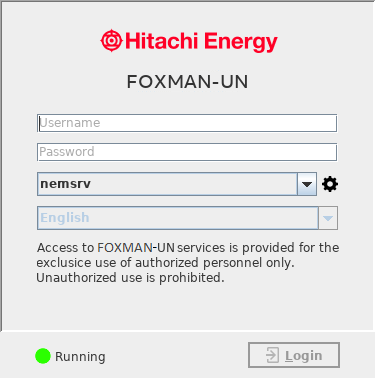
NEM Login
If a user logs in to the specified host for the first time, they will be prompted an “SSL Certificate Verification” dialog upon pressing the <Login> button which looks as the following sample dialog:
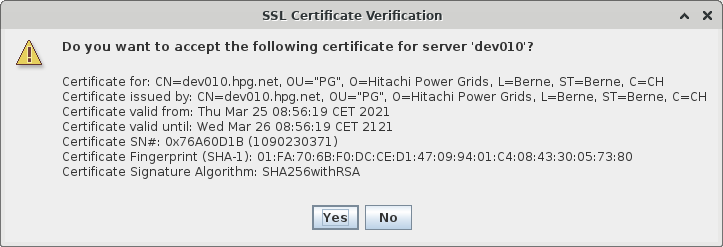
SSL Certificate Verification
If the user presses the <No> button, they will not be able to connect to the FOXMAN‑UN server. The next time they try to login to the same host from the same client, they will be prompted again the “SSL Certificate Verification” dialog.
If the user presses the <Yes> button, they will be connected to the FOXMAN‑UN server. The next time they try to login to the same host from the same client, they will directly be connected to the server (they will no longer be prompted the “SSL Certificate Verification” dialog).

Please note:
Make sure that you are connecting to the correct server especially from a remote client. This is particularly important when you are working in a non-safe network environment like for instance accessing a FOXMAN‑UN server over the public Internet.
Validation can be done by the user by contacting the server administrator and comparing the fingerprint of the FOXMAN‑UN server certificate stored on the server to the one presented in the “SSL Certificate Verification” dialog on the FOXMAN‑UN client.
Once the username and password are accepted on the specified host, and once the login is successful, the NEM Desktop is started.
A given user, except the NEM Security Administrator (nemsec), can only log in once on FOXMAN‑UN. This implies that the FOXMAN‑UN Core keeps a list of active sessions. If a user attempts to log in again in parallel, the login is refused and a message informs of the presence of another session on a client host.