
Commissioning
IP connectivity to the FOXMAN-UN core
• We strongly recommend to enable the Windows® Firewall (Start – Control Panel – Windows Firewall).

Please note:
If you use the firewall, please make sure to configure appropriate firewall rules to enable communication between the core and the client. Depending on the firewall used, you may also confirm to allow the FOXMAN-UN Client application connecting through the firewall upon its first use. More details on required ports are given in the application note “1KHW029012 FOXMAN-UN in Firewalled Environment”.
• Establish a physical Ethernet connection either to the FOXMAN-UN core machine or to the network leading to it.
• Set up the IP address of the local Ethernet interface used to connect to the FOXMAN-UN core machine:
− From the “Start” menu select “Settings - Network Connections” and the relevant “Local Area Connection”.
− Under the tab “General” select “Properties” which returns the following dialog:
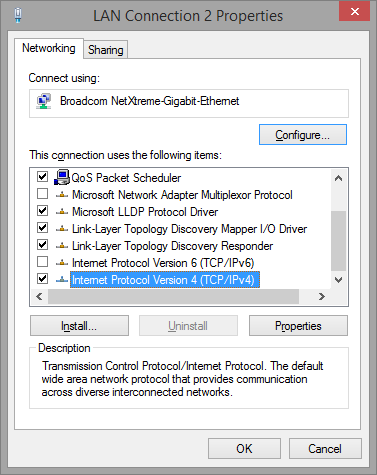
− Select “Internet Protocol Version 4 (TCP/IPv4)” and start “Properties”. This returns the following dialog:
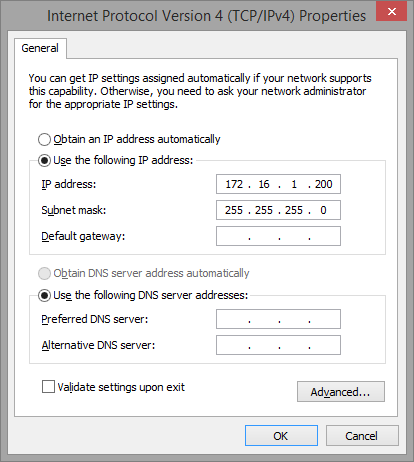
− Activate the frame “Use the following IP address” and enter IP address, subnet mask and default gateway if required.

Please remember that IP addresses must be unique. Therefore, make sure your managing PC has a different IP address from all other network devices. In case of doubt, contact your network administrator when configuring IP addresses.
• If applicable, make sure a route is established through the network to the FOXMAN-UN core machine as well as a route back from there to the PC.
• If no name server is available to perform address resolution, an entry must be made in the hosts file giving the IP address and the hostname of the FOXMAN-UN core machine. Please notice the last line of the following sample file contents:
C:\WINDOWS\system32\drivers\etc\hosts:
# Copyright (c) 1993-2009 Microsoft Corp.
#
# This is a sample HOSTS file used by Microsoft TCP/IP for Windows®.
#
# This file contains the mappings of IP addresses to host names. Each
# entry should be kept on an individual line. The IP address should
# be placed in the first column followed by the corresponding host name.
# The IP address and the host name should be separated by at least one
# space.
#
# Additionally, comments (such as these) may be inserted on individual
# lines or following the machine name denoted by a '#' symbol.
#
# For example:
#
# 102.54.94.97 rhino.acme.com # source server
# 38.25.63.10 x.acme.com # x client host
# localhost name resolution is handled within DNS itself.
# 127.0.0.1 localhost
# ::1 localhost
# the following is the NEM core machine entry.
172.31.41.200 nemsrv