
NEM Host Manager
The NEM Host Manager (formerly known as NEM Connection Manager) serves definition of hosts to which the user can connect from the NEM Login Window. It can be launched by clicking on the gearwheel icon  on the Login Window. Every FOXMAN-UN client needs to define its own list of hosts.
on the Login Window. Every FOXMAN-UN client needs to define its own list of hosts.Hosts can be added in the Host Manager by means of the <+Add> button. All added hosts will be visible in the hosts list of the Host Manager with the following attributes:
• Server (hostname)
• IP Address
• State
• Type
• Partner Server
Partner servers will only be visible if they have been paired properly.
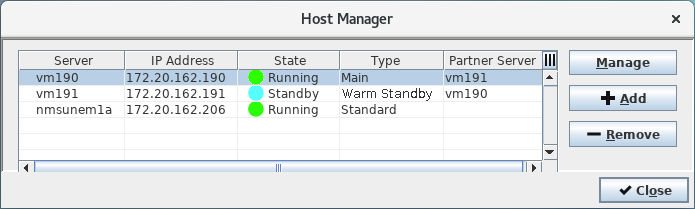
<Host Manager> showing three servers of different type
Selection of a server in the hosts list and clicking on the <Manage> button will start the Remote Admin Tool for the selected server. Double-clicking on a row in the hosts list will close the Host Manager and enter the respective host in the “host field” of the NEM Login Window.