
Internal Behavior
In this scenario, the FOXMAN-UN Core and EA components reside on one machine, which shall be referred to as the FOXMAN-UN Server, while the FOXMAN-UN Client is installed and used on a separate machine, running on Linux or Windows®.
An overview of the communication between the FOXMAN-UN Server and the FOXMAN-UN Client is explained below:
1 The FOXMAN-UN Server listens for incoming client requests on the ports:
− 9005, 9006, 5671 (fixed port numbers)
and ports in range:
− 40000 … 40099 (range configurable).
2 The FOXMAN-UN Client makes connections to the FOXMAN-UN Server services.
This requires several TCP port connections from the client’s NEM Desktop to the FOXMAN-UN Core Server.
This requires several TCP port connections from the client’s NEM Desktop to the FOXMAN-UN Core Server.
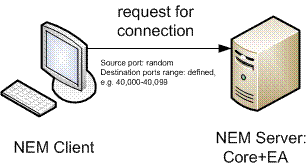
FOXMAN-UN Server listens, FOXMAN-UN Client initiates requests
3 The FOXMAN-UN Client actively listens for notifications and callbacks from the FOXMAN-UN Server on any available TCP ports, by default no restriction is applied.
Note:
As basic configuration, the FOXMAN-UN firewall configuration file proposes the port range 55000-55200 controlled by the following parameters:
− nemdesktop_server_range
− hwview_server_range
− ucst_server_range
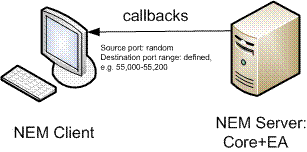
FOXMAN-UN Client listens, FOXMAN-UN Server initiates callbacks
4 Whenever the FOXMAN-UN administrator opens up new Client Application, e.g. NEM Network Browser, new TCP port connection is established between the two systems.
All these TCP ports or port ranges must be opened in the firewall in order to establish communications between FOXMAN-UN Client and FOXMAN-UN Server components.